



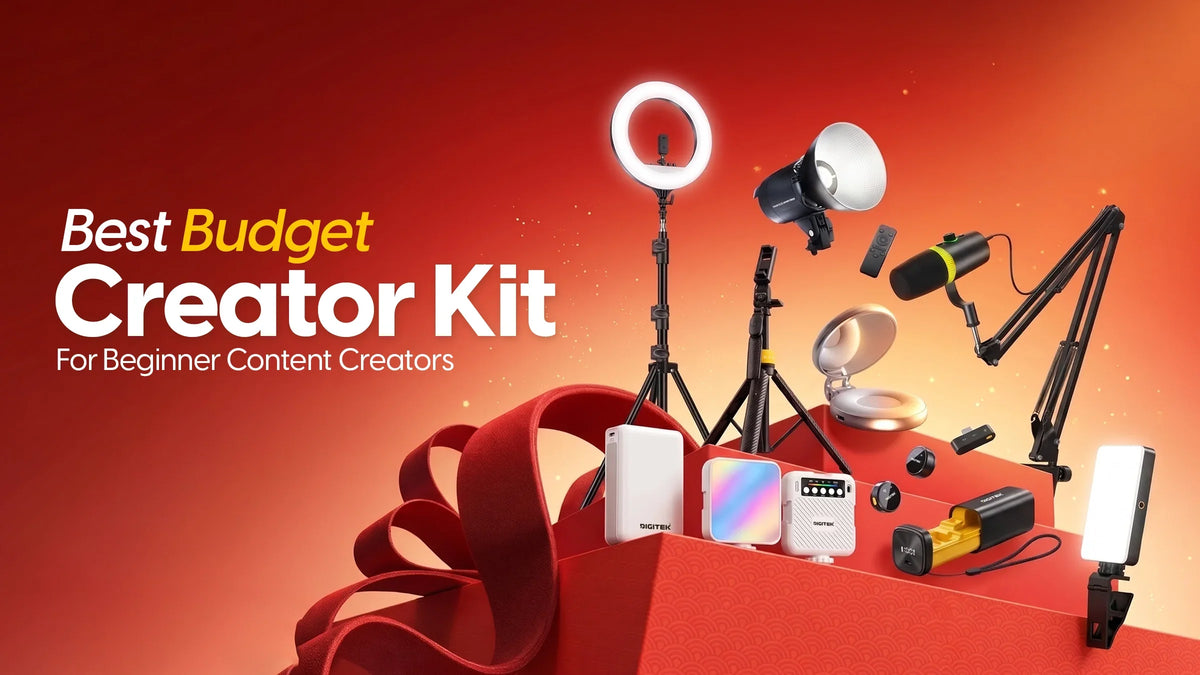
Starting your content creation journey is exciting until you begin putting together your first setup. You need a microphone for clear audio, a tripod to keep your shots steady, and good lighting to make your videos look professional. Buying everything separately can feel confusing, especially when you're working with a limited budget.
That's where a Creator Kit makes things easier.
Instead of spending hours choosing individual accessories, a ready-made kit brings together the essentials you need to start shooting. Digitek offers five creator kits, ranging from compact smartphone setups to more advanced lighting combinations.
Whether you're starting a YouTube channel, recording Instagram Reels, creating tutorials, or filming product reviews, here's how to find the right setup without buying equipment you don't need.
Key Features & Benefits of a Beginner-Friendly Creator Kit
A good starter setup isn't about having the most equipment. It's about solving the problems that affect your content quality.
- Record clearer audio: Wireless microphones help keep your voice audible during reels, interviews, tutorials, and vlogs.
- Avoid shaky footage: Tripods provide stable framing for hands-free recording, reducing unnecessary camera movement.
- Improve video lighting: LED lights and ring lights help illuminate your face or subject, especially when natural light is insufficient.
- Spend more thoughtfully: A bundled kit brings together compatible categories of equipment, making it easier to plan your setup instead of purchasing accessories at random.
- Create from different locations: Compact accessories make recording easier from bedrooms, home studios, workspaces, and other shooting locations.
- Build confidence with your setup: Having dedicated audio, lighting, and camera support allows you to focus more on your content.
Perfect For Beginners Who Want to Start Creating
Digitek's starter kits are ideal for anyone looking to start creating content on YouTube, Instagram, podcasting, beauty blogging, and small businesses.
If you are shooting your very first talking-head video, making a demo, or setting up an educational channel, then a Beginner-friendly Content Creation Kit will allow you to set up a reliable starting kit.
These kits are also useful for those people who wish to step up their game beyond shooting content using only a smartphone and room lights.
Who Should Consider Something Else?
If you already have professional microphones, tripods, and lighting equipment, buying another complete kit is unnecessary.
Similarly, creators who mainly shoot moving footage may need a gimbal rather than a stationary tripod. The best choice depends on whether you record at a desk, in a studio, or while travelling.
Meet the 5 Digitek Creator Kits
Digitek offers different combinations of audio, lighting, and stabilisation gear, allowing users to choose according to their content style and shooting requirements.
1. Digitek Creators Special Kit 1: A Simple Start for Everyday Content
Includes: DWM-010 Microphone + DTR-555 SS Tripod + LED-D7W Video Light
You have a concept for your first reel, but your phone just won't stay in place on that makeshift stand. The lighting in the room is not working in your favour, and you don't sound close enough to your audience.
This pack is designed to solve the most fundamental problems you face while recording with three basic essentials.
With the Digitek DWM-010 Microphone, you can get high-quality audio for your videos, live streaming, and interviews. DTR-555 SS Tripod will help you shoot without using your hands. And the LED-D7W Light will help you get better lighting.
Why choose this kit?
It provides a straightforward starting point for users who need audio, lighting, and a stable recording setup without assembling each category separately.
Best for: Instagram Reels, beginner YouTube videos, personal vlogs, online tutorials, and everyday social media content.
2. Digitek Creators Special Kit 2: More Flexibility for Everyday Shooting
Includes: DWM-014 Microphone + DTR-565 SS Tripod + LED-D6W Video Light
When you're creating different types of content throughout the week, setting up your equipment shouldn't become another task.
The Digitek Creators Special Kit 2 features the DWM-014 Microphone for superior voice capture, the DTR-565 SS Tripod for shooting hands-free and the LED-D6W Light for better lighting of your videos.
The DTR-565 SS tripod is especially handy for those who want to have different compositions. The reason being its telescoping nature and ability to shoot at various angles.
Why choose this kit?
It brings together everyday recording essentials for creators who regularly switch between videos, short-form content, and tutorials.
Best for: lifestyle vloggers, educational creators, product reviewers, social media videos, and livestreaming.
3. Digitek Creators Special Kit 3: Better Lighting for Face-to-Camera Content
Includes: DWM-123 Wireless Microphone + DRL-18 RTC6 Ring Light with Stand
Everyone does not need three to four accessories.
A clear voice and proper lighting can make the biggest difference.
The Digitek DWM-123 Wireless Microphone helps improve voice recording for interviews, podcasts, livestreams, and social media content. Its dual-transmitter setup also makes it useful for recording conversations involving two speakers.
The DRL-18 RTC6 Ring Light with Stand provides dedicated illumination for brighter, more consistent face-to-camera videos.
Why choose this kit?
For creators who already have a suitable phone or camera stand, this kit focuses on upgrading sound and lighting rather than adding more equipment.
Best for: beauty tutorials, makeup videos, talking-head reels, online interviews, educational videos, and livestreaming.
4. Digitek Creators Special Kit 4: Professional Lighting for Growing Channels
Includes: DWM-124 Wireless Microphone + DCL-150WBC Continuous LED Light + DLS-009 Light Stand
As your content improves, your lighting requirements often become more demanding.
Perhaps you're making longer videos, shooting products, or doing your recordings in a room where the natural light is constantly changing.
Digitek Creators Special Kit 4 presents you with a more sophisticated set of equipment.
The DWM-124 Wireless Microphone comes with smart noise cancellation, wireless range of up to 80m, and battery life of about six hours.
The DCL-150WBC Continuous LED Light produces 13,500 lumens of light with adjustable bi-colour temperature ranging from 3000K to 6500K and CRI 95.
The DLS-009 Light Stand provides you with a lighting setup up to the maximum height of 250 cm.
Why choose this kit?
It is suitable for creators who want stronger lighting control and a more established recording setup.
Best for: YouTube channels, interviews, instructional videos, product photography, indoor shoots, and home studios.
5. Digitek Creators Special Kit 5: A More Complete Studio Setup
Includes: DWM-116 Wireless Microphone + DCL-150W Continuous LED Light + DSB-65 Softbox + DLS-009 Light Stand
Have you ever recorded a video where the lighting was bright enough, but the shadows made everything look harsh?
More brightness isn't always the answer. Sometimes, you need softer, better-controlled light.
This four-piece Creator Kit brings together audio equipment, a continuous light, a softbox, and an adjustable stand.
The DWM-116 Wireless Microphone features 360° sound capture, a magnetic collar clip, and up to 40m wireless range.
The DCL-150W Continuous LED Light provides powerful illumination, while the DSB-65 Softbox helps diffuse light, reduce harsh shadows, and create softer illumination for faces and products.
The DLS-009 stand supports convenient light positioning.
Why choose this kit?
The additional softbox offers greater control over the quality of light, making this combination particularly useful for creators who regularly film indoors.
Best for: professional-looking YouTube videos, beauty content, interviews, educational courses, product demonstrations, and home studio recordings.
Which Digitek Creator Kit Should You Choose? Quick Comparison 2026
Every kit solves a slightly different recording need. The most suitable option depends on what you're creating and which equipment you already own.
|
Digitek Kit |
Included Essentials |
Best For |
Main Advantage |
|
Kit 1 |
Mic + Tripod + LED Light |
First-time creators |
Basic three-part setup |
|
Kit 2 |
Mic + Tripod + LED Light |
Regular smartphone creators |
Flexible everyday shooting |
|
Kit 3 |
Mic + Ring Light |
Talking-head content |
Focused audio and face lighting |
|
Kit 4 |
Mic + Continuous Light + Stand |
Growing YouTube channels |
Powerful adjustable lighting |
|
Kit 5 |
Mic + Continuous Light + Softbox + Stand |
Home studios |
Softer, controlled lighting |
Verdict: If you're starting from scratch, consider Kit 1 or Kit 2. Kit 3 is a practical option for face-to-camera content, while Kits 4 and 5 offer more advanced lighting solutions.
The kits have different equipment configurations, but their current prices and warranties have not been provided here. Check Digitek's latest listings before deciding which kit offers the best value for your budget.
How to Set Up Your First Content Creation Space
You don't need an elaborate studio to create better videos. Even a small, uncluttered corner can work well when your equipment is positioned correctly.
Step 1: Fix Your Camera Position
Place the smartphone or camera on the tripod and make sure that it is fixed properly. The camera must be set at eye level for the video.
Step 2: Position Your Microphone
Make sure that the wireless microphone is fixed to your body properly without any interference. You can record a small clip to make sure that you have the proper sound quality.
Step 3: Adjust Your Lighting
For shots where you look into the camera, position the LED light or ring light slightly above eye level.
Play around with lighting settings and angle to make sure your face is adequately lit, but there are no highlight points.
Step 4: Record a Short Test Video
Before recording an entire reel or YouTube video, make a test video clip.
This easy technique will help avoid unnecessary re-recording.
Step 5: Start Creating
After setting up everything, just concentrate on the main thing – conveying your message.
Practice is much more useful than purchasing new devices constantly.
Real Benefits You Can Expect From the Right Setup
The value of a creator kit becomes clearer when you look at what each accessory contributes.
Better voice recording: A dedicated microphone makes it easier to capture clear audio since it is closer to the source.
More consistent framing: Using a tripod ensures that one retains the same composition for their recording throughout the process.
Improved lighting control: Dedicated lighting makes it easier for one to see clearly even when the lighting is not favourable enough.
Greater creative flexibility: Different kit configurations support everything from casual reels to more controlled indoor productions.
Frequently Asked Questions
1. What is the best Creator Kit for beginners?
The ideal Creator Kit for a beginner is one which contains a microphone, tripod, and a light. The three mentioned accessories cover the most common problems of recording - unclear audio, wobbling pictures and lack of light. Digits Creator Special Kits 1 and 2 include these basics.
2. Is a Beginner-Friendly Content Creation Kit worth buying?
Indeed, especially if you do not have any recording accessories at all. Buying a package of devices will save some time on choosing and will give you everything necessary for the creation of reels, tutorials, interviews, YouTube videos and so on. Remember to compare prices in bundles and separately.
3. Do I need a DSLR camera to use a creator kit?
No. Many beginners record content using smartphones. A suitable tripod, microphone, and LED light can help improve smartphone videos considerably. Always check the microphone connector and mounting compatibility with your specific device before purchasing.
4. Which Digitek kit is best for YouTube videos?
Kits 1 and 2 offer you the essential things needed for recording on YouTube, such as audio and lights. However, if you want to have controlled lighting indoors, Kit 4 will give you a very strong continuous light source, while Kit 5 will provide you with a softbox light.
5. Is a ring light better than an LED video light?
While a ring light may be a good choice for you when you are recording face-to-camera videos and beauty videos and even for online presentations, an LED Video light gives you freedom of positioning and light types.
6. Where can I buy a Digitek Creator Kit?
You can explore Digitek's creator kit range through its official website and available retail channels. Compare the included accessories, device compatibility, current prices, and warranty details before selecting the kit that matches your content requirements.
Testimonials
"The softbox is a great addition to my indoor content. I noticed the improved lighting and don't have to worry about any shadows while editing the footage. "Neha Kapoor, Beauty Content Creator, Bengaluru
"I wanted to begin shooting reels, but I wasn't sure about what to purchase for that. The Digitek Creator Kit provided me with all the necessary stuff – the mic, the tripod, and the light." Aarav Mehta, Content Creator, Delhi
"Lighting and stability were major problems for me. When I got both the tripod and the LED light, it became really easy to shoot at home." Riya Sharma, Lifestyle Vlogger, Mumbai
Start Creating With the Right Digitek Kit
Your first video does not require a costly professional setup. Rather, it requires good audio quality, proper framing, adequate lighting, and a good idea to communicate.
Whether it's your first time creating an Instagram Reel or starting a YouTube channel, whether you are making tutorials or setting up your own studio, the Digitek Creator Kits are available for different levels of creators.
Check out the various Digitek Creator Kits.

Leave a comment
This site is protected by hCaptcha and the hCaptcha Privacy Policy and Terms of Service apply.